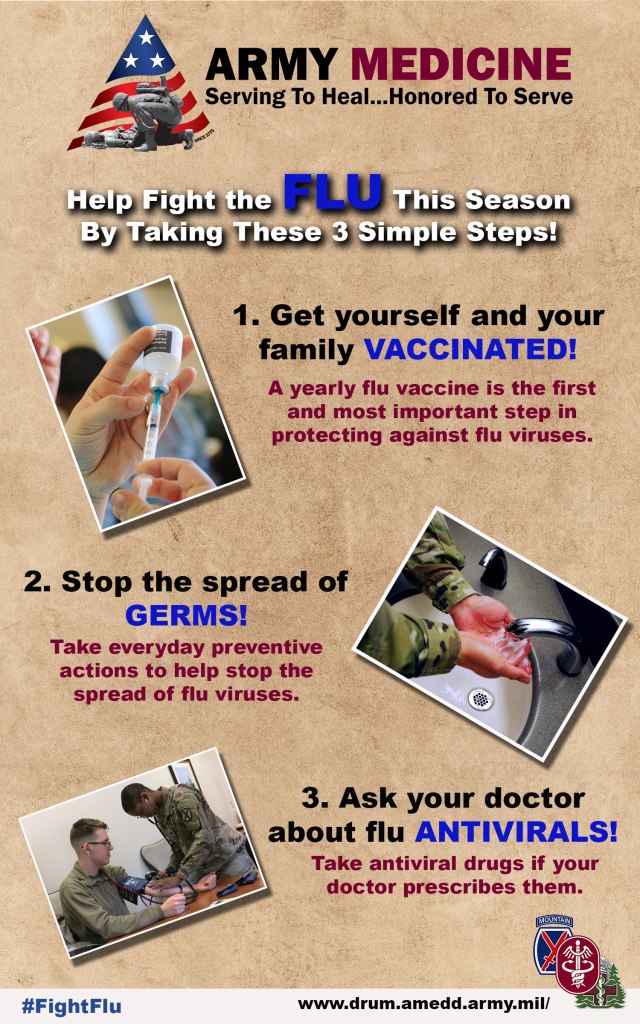
For my project, I decided to provide some information about how to combat
the flu this season. Given that my topic is Army Medicine, and with the flu
being so prevalent in the news lately, I figured this would be an excellent way
to share an important topic with my audience. It’s designed to be informative
while not being filled with so much information the reader loses
interest.
I wanted my initial draft to be simple while at the same time attracting the
reader’s attention. I drew my information directly from the CDC website on the
three tips to help combat the flu, which can be found here: https://www.cdc.gov/flu/prevent/prevention.htm.
The three photos are public domain photos downloaded from the Defense Visual
Information Distribution Service (DVIDS) and depict an Amy Soldier or medical
professional (two of the photos are mine I took for work). The text boxes with
the steps are matched up with the picture beside it to ensure both work
together. For all three photos, I utilized a border following the same steps in
the cutouts and blending modes Photoshop tutorial. I opened each photo
individually, added a new layer, used the paint bucket to fill in the layer
black, used stroke in the layer style box and changed the size to meet the
needs, changed fill to 0%, and saved the photos as JPGs before using place
embedded to add them to my design.
Next, I used the Transform – Rotate tool in the edit menu to tilt each photo
slightly. I also included a drop shadow from the layer style box on each photo.
For my background, I decided to use a simple design from Pixabay.com, which is
free for commercial use and no attribution required. I needed a background
where all the elements would work on top of without flushing anything out.
For the logos, I used the official Army Medicine logo on the top and on the
bottom right a design I made, which incorporates the 10th Mountain Division
Patch, the Fort Drum Medical Activity Logo, and the Army Medical Command Patch.
Each element was used to help with the branding of the design. I also included
a link to our webpage as well as a hashtag others can use when sharing.
When designing the text, I went through a few different ideas before landing
on one I felt was visually appealing while at the same time easy to read. I
changed sizes, type and weight until I came up with the right design that would
pop and be readable. For the top line of text, I also added a drop shadow using
the layer style box. All drop shadows use global light so they all match in
direction.
Throughout the entire process of my draft design, I used the move tool to
shape and resize the images and text to ensure they fit on the page
logically.
When working on my final draft, I incorporated some ideas I received as
feedback from my classmates. First, it
was recommended I number my tips so they flow logically, which I incorporated
into my final design. Next, I received
feedback that it would look good if I used some push-pin graphics to make the
photos look like they were pinned to the background. However, I tried that and it looked a bit
tacky (see what I did there?). Seriously
though, it didn’t look as good as I thought it would, so I decided not to use
that idea.
Some other changes I made based on feedback was to use a lighter color which
had some more contrast with the background for the word FLU, which I changed to
the same blue color I used in the highlighted words in the steps and I
capitalized “the” on the top line to make it consistent with the rest of the
text. After that, I had my final
design. I want to target Soldiers and
their families with this design. While it’s a requirement for Soldiers to get a
flu shot every year, it’s not for their family members. I wanted to design a
product that would be easily understandable to anyone reading it while at the
same time grabbing their attention.
Thank you for taking a look and I hope you enjoy.
Photo and Graphic Credits:
“Army Medicine Graphic”, courtesy graphic, public use. https://armymedicine.health.mil/
“Army Medics” , by Warren W. Wright Jr., Fort Drum Medical Activity, public
use. https://www.dvidshub.net/image/5283702/fort-drum-nurses-medics-get-hands-during-nursing-skills-fair
“Fort Drum MEDDAC 3 Patch”, design by Warren W. Wright Jr., Fort Drum
Medical Activity, public use.
“Hand Washing Photo”, courtesy photo, 21st Space Wing, public
use. https://www.dvidshub.net/image/5761746/support-mission-wash-your-hands
“Paper, Old Texture”, by Chris Fiedler, Pixabay, free for commercial use. https://pixabay.com/photos/paper-old-texture-parchment-1074131/
“Syringe Photo”, by Warren W. Wright Jr., Fort Drum Medical Activity,
public use. https://www.dvidshub.net/image/5283711/fort-drum-nurses-medics-get-hands-during-nursing-skills-fair

